Human–AI Interaction: A Transition Network Analysis with cograph
Most evaluations of AI coding assistants — Copilot, Cursor, Claude Code — measure productivity: lines generated, bugs caught, time saved. The temporal patterns of the conversation with AI itself rarely get analyzed: the repair cycles, the steering moves, the moments where the developer corrects, interrupts, or argues. This post does that. I am here analyzing my own data that I complied over the last few weeks using my own interaction with Claude Code. It is my first work with a command line coding agent and I thought, I would learning from the experience. More importantly, I will show case, cograph, which was developed and released over the past year. I applied the analysis to 13,002 interleaved turns of interactions with an AI coding assistant — 6,175 from me, 6,827 from the AI — across 429 sessions, and 60 days. During these days, I experimented with coding applications, visualization tools and web platforms. Both sides of every conversation are coded, giving a complete sequential record of the exchange. I will be using, TNA, which is a method I developed with colleagues for modelling temporal patterns in process data (Saqr et al., 2025a; Saqr et al., 2025b). The analysis uses two R packages: tna (sonsoles.me/tna), and cograph for network visualization. cograph is a very powerful network visualization and analysis package that supports complex networks with simple interact and complete compatibility with tna and our other analytics stack. I will be demonstrating the Multi-Cluster Multi-Level (MCML) network plots shown below — which cluster fine-grained codes into higher-order groups and display transitions at both levels simultaneously, giving multi-layer view of both perspectives (the fine grained and its summary). I will also show heterogenous transition network analysis which shows two different actors working together (me and AI). The data was collected and coded by AI, so it maybe not very accurate especially the coding.
The taxonomy
With the help of AI, I built a three-level hierarchical coding scheme. My messages were coded automatically by an LLM reading the full conversation text. AI responses were coded heuristically from the the transcript structure — AI tool-use blocks identify action types(debugging planning, coding, correcting); text patterns identify communicative function. Multi-coding was permitted. After expansion we had 19,347 coded events.
Human — 15 fine codes, 9 categories, 3 super-categories:
| Super-category | Categories | Fine codes |
|---|---|---|
| Directive (49%) | Command, Request, Specify | Command, Direct, Request, Specification, Context |
| Evaluative (30%) | Refine, Correct, Verify, Frustrate | Refinement, Correction, Reject, Verification, Frustration, Arguing |
| Metacognitive (21%) | Inquire, Interrupt | Ask, Thinking, Interrupt, Accept |
AI — 18 fine codes, 8 categories, 3 super-categories:
| Super-category | Categories | Fine codes |
|---|---|---|
| Action (68%) | Execute, Investigate, Delegate | Execute, Comply, Retry, Investigate, Diagnose, Delegate |
| Repair (23%) | Plan, Repair | Plan, Scaffold, Suggest, Apologize, Hedge, Warn, Refuse, Escape |
| Communication (9%) | Explain, Report, Ask | Explain, Report, Acknowledge, Ask |
Less than half of what I did was directive. This is impressive to me, given that these agents are so sure and are notoriously capable. Thirty percent was evaluation: refining, correcting, verifying, arguing, expressing frustration. Twenty-one percent was metacognitive: asking questions, thinking out loud, interrupting. This is the part I loved myself. There were these moments that AI was good, responsive and understanding, and I would say, they were not many of them given that AI context get corrupted and AI seems to have lost its brain after some time of working with it. More time went to assessing and steering than ordering. On the AI side, nearly a quarter of its behavior is repair — planning, suggesting, apologizing, hedging, warning. Yes, AI apologized and when I discovered it was doing wrong things. But, the moments I liked the most, when we had an honest discussion about a feature and I pressed in one direction asking AI to evaluate it, and AI pushed back saying not worth it, it will add complexity and issues and won’t bring any new functionality. AI also planned extensively (18.7%) and investigated heavily (26.5%). Ask and Report barely happened. Most interestingly, I rejected AI plans 8.5 times more than I accepted which is a very high number given that AI plans are very structured and well-presented after a significant time of thinking and collecting information that at times extended over longer periods. Overall, I rejected proposals 2.6% of the time, argued 2.7%, interrupted mid-generation 7.9% to correct AI thinking and offer a clue and expressed frustration 6.0%. These frustration moments are interesting, I caught AI cheating and faking numbers five times in a row. Each time, AI apologizes and come back with a new plan, reading the results, I push back and it would appear that it was not honest. Therefore, I spent most of my time and effort doing insane amount of verification using tens of thousands of synthetic datasets with all possible cases and against established state of the art. Nevertheless, let’s explore my coding style as coded by AI.
Multi-Cluster Multi-Level networks
MCML plots cluster fine codes into higher-categories and render tna networks at both levels: summary edges between clusters show the macro tna; internal edges show micro-dynamics within each cluster.
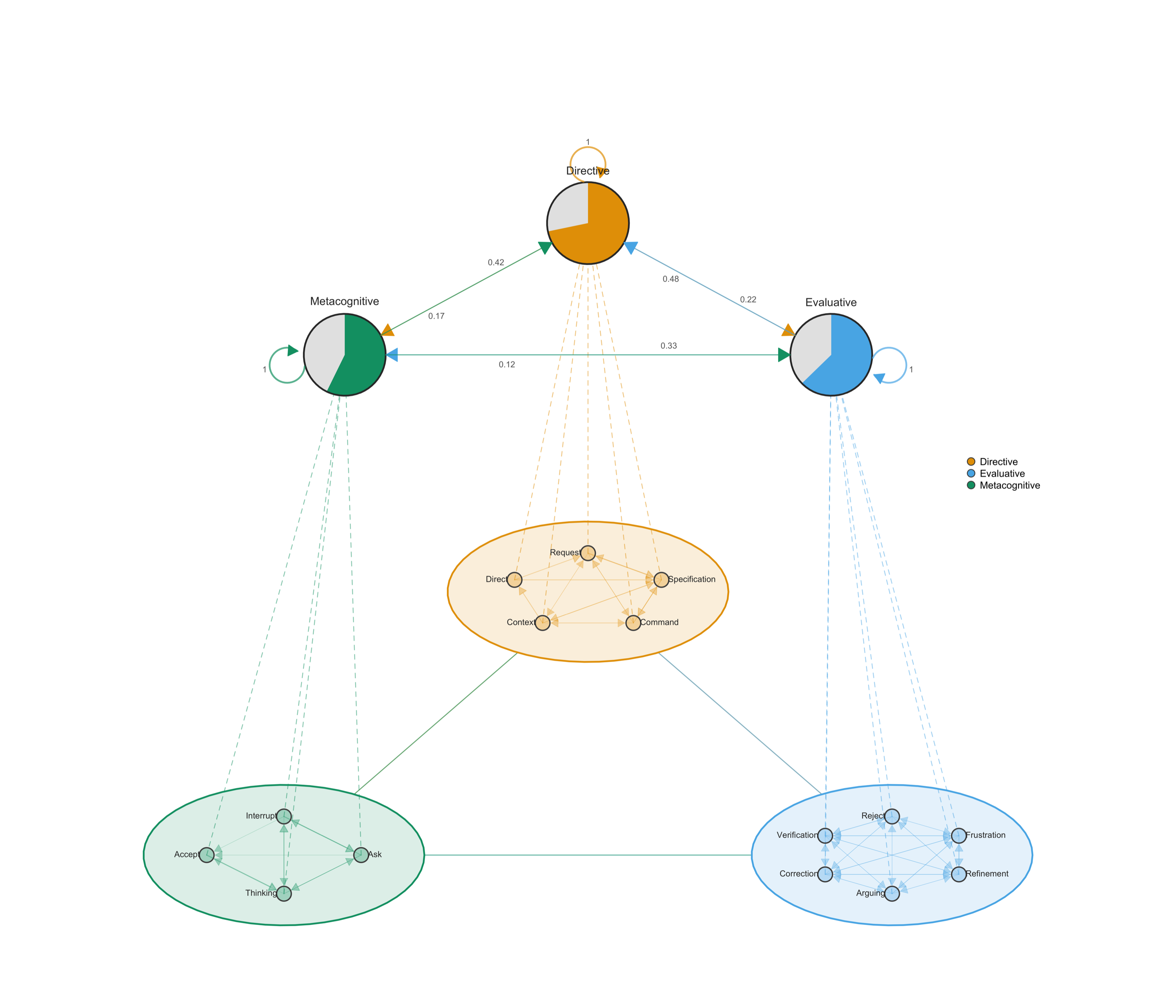
Each of the cluster takes one of the categories of coding. MCML is particularly useful when you have many codes or nodes that can be meaningfully clustered. In my case, the evaluative cluster is internally dense. Refinement, Correction, Frustration, and Verification form tight loops indicating repetitive frustration due to absence of intent understanding between AI and me. Within Metacognitive, Interrupt flows directly to Command — halting the AI is immediately followed by redirection. Within Directive, Specification → Command dominates as expected.
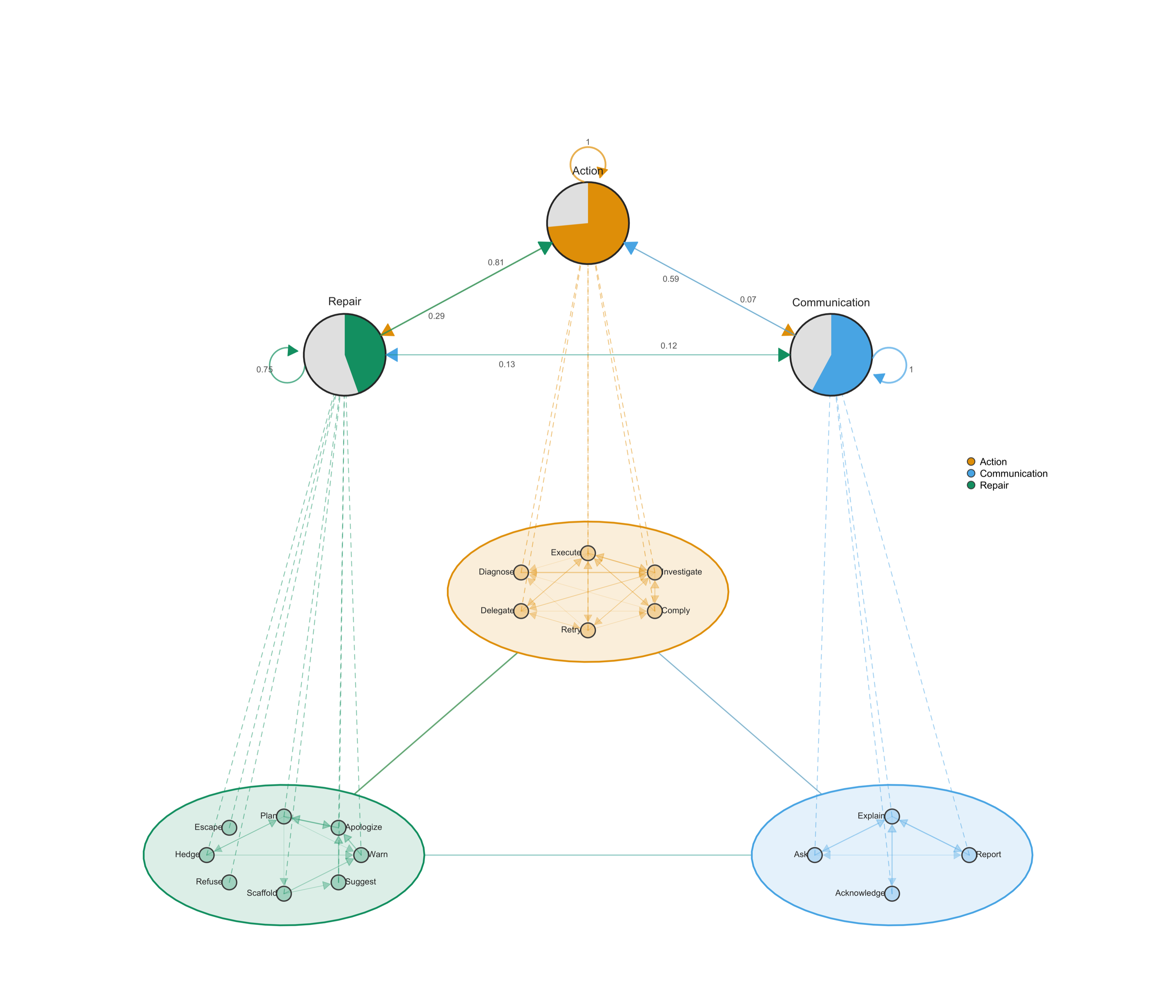
The AI network is dominated by Execute ↔ Investigate — alternating between writing and reading code. Plan transitions to Execute. After acknowledging an error, the AI retries rather than asking for guidance and there fore, communication from AI is minimal. That is, it rarely asks or gives choices, it usually goes into doing by saying let me do it.
Category frequencies
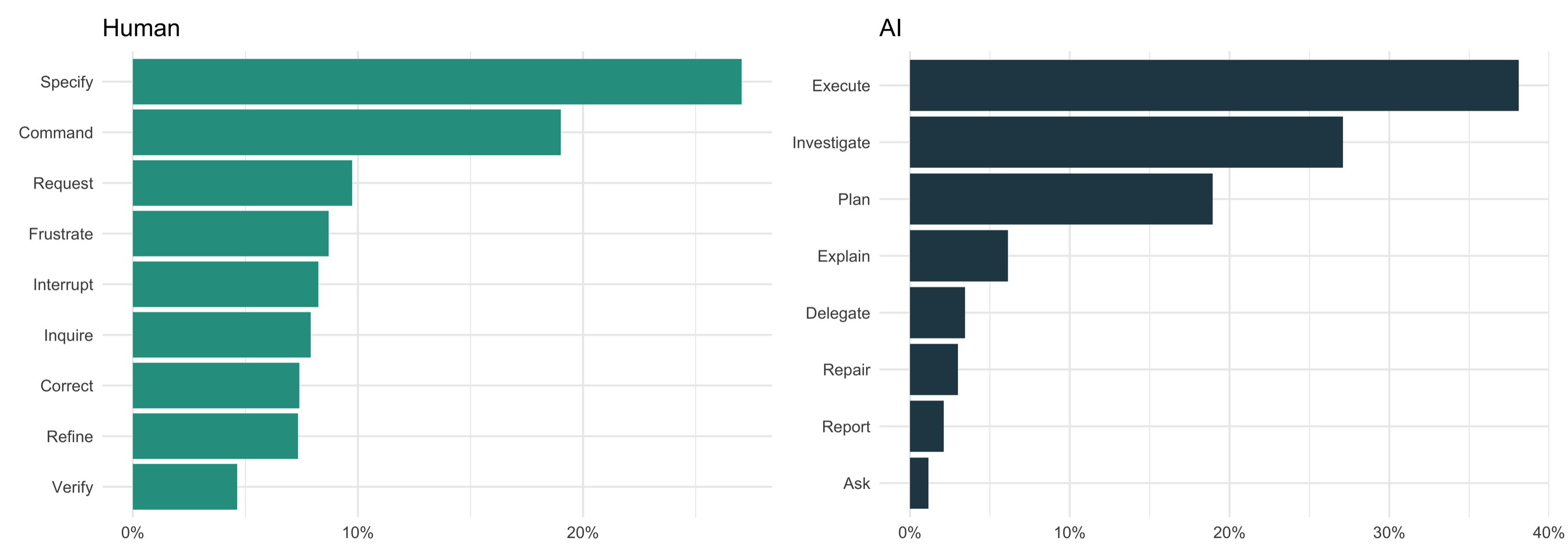
Specify and Command lead on the human side — but Frustrate outranks Verify. Interestingly dissatisfaction was expressed more often than results were checked. Execute and Investigate dominate the AI distribution; Ask and Report are negligible.
Bootstrap transition networks
I will use Bootstrap to filter and retain only transitions that appear consistently across my sessions and clean the data from insignificant edges. The figures below show filtered networks rendered with cograph::splot(). This new function from cograph offers a nice visualization with p-values and stars to demonstrate the statistical significance of edge stability, a new feature that helps cover a gap in network plots.
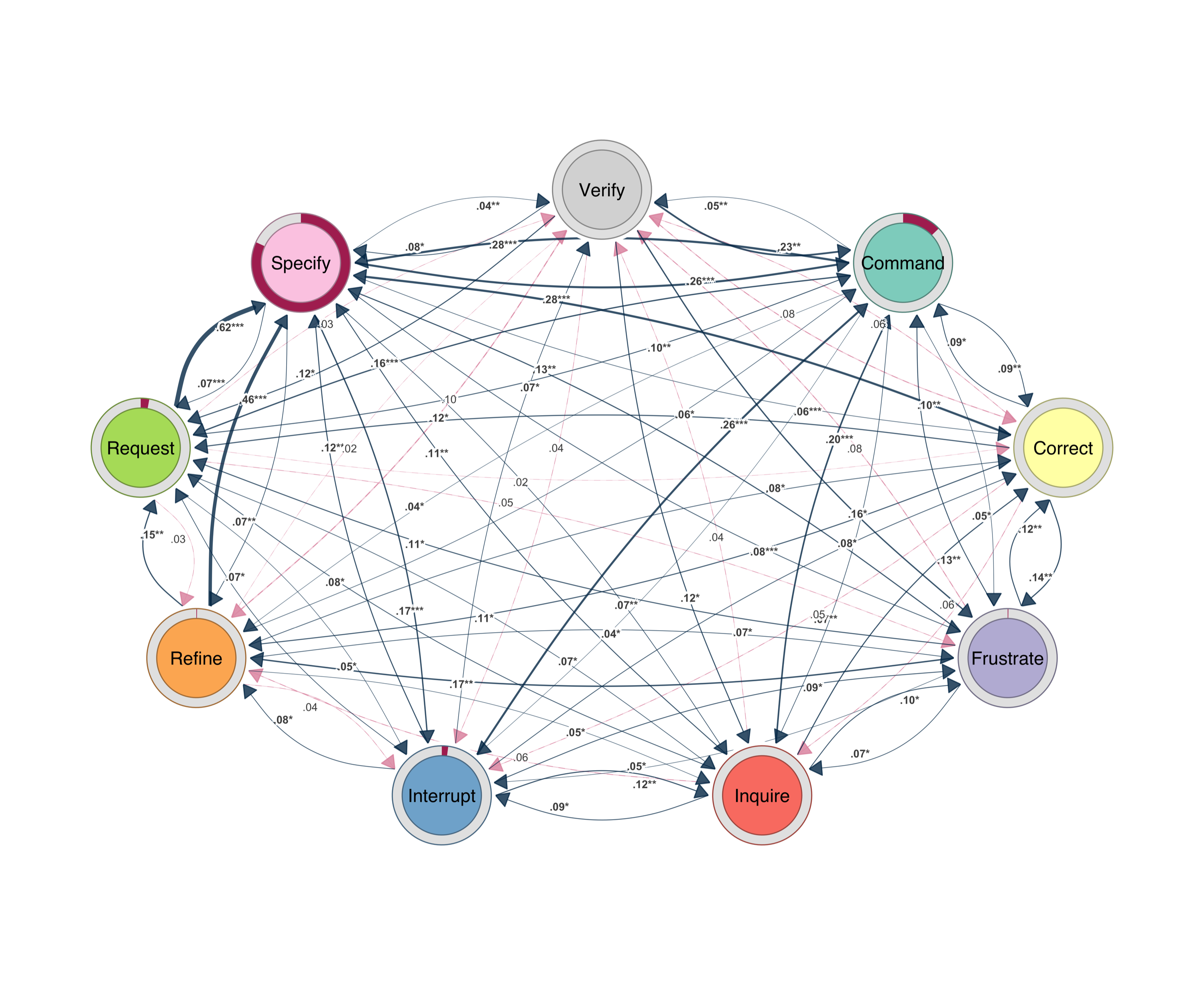
cograph::splot().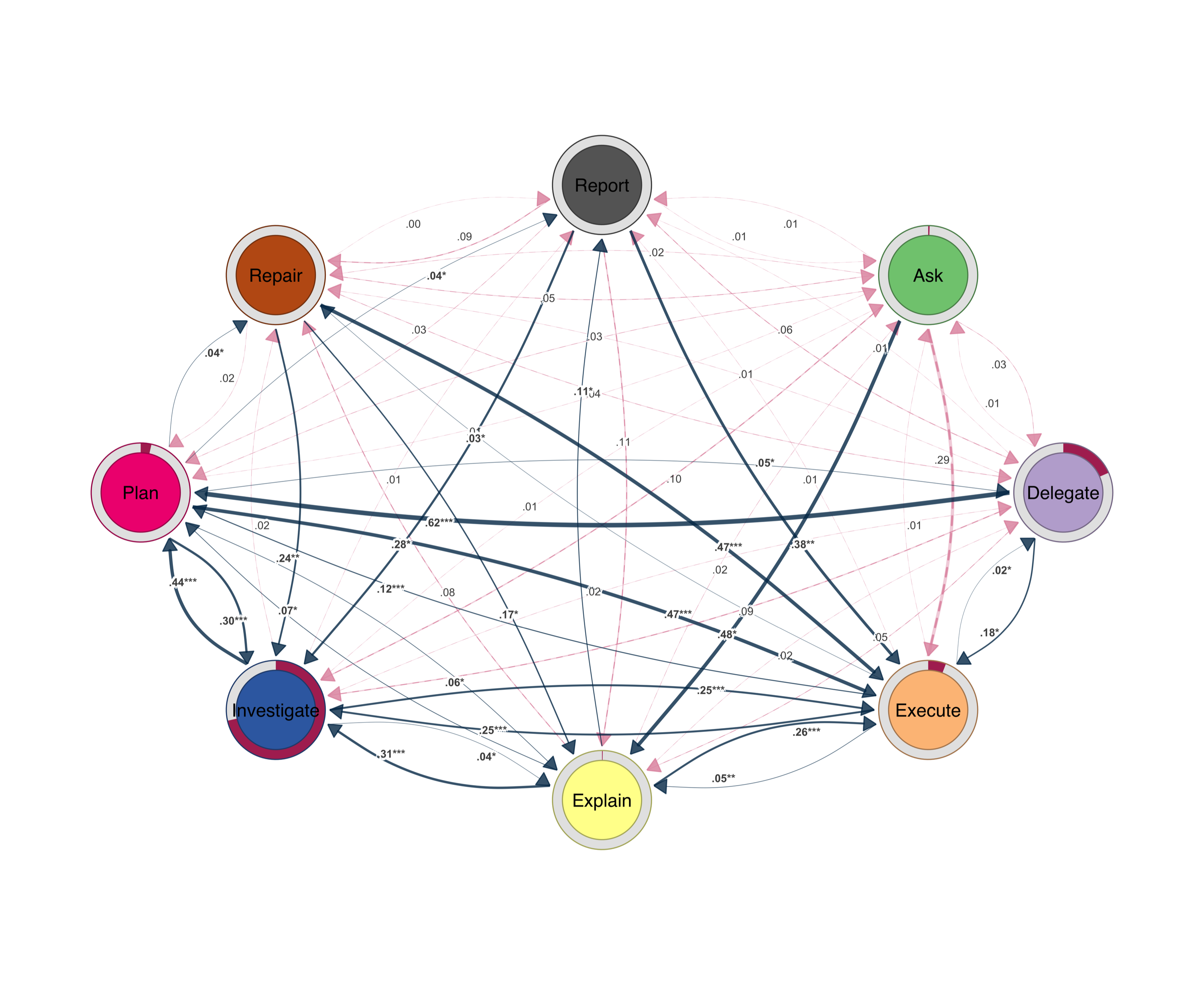
cograph::splot().The prominent transitions revolve around command, inquire, specify and request. The Refine ↔ Specify loop is iterative tuning — each adjustment requires new parameters, which trigger further adjustments. Verify feeds into Refine and Correct; checking output almost always triggers more work. Inquire leads to Specify.
The AI network is sparser. Execute ↔ Investigate ↔ Plan is the core triangle. After errors, the AI retries (Repair → Execute) rather than asking. Explanation is brief — Explain → Execute. Ask barely appears.
What the data shows
Directive turns account for less than half my side. The rest is evaluation, argument, correction, and metacognitive steering. The AI spends a quarter of its turns in repair — planning, hedging, apologizing, retrying. Verification triggered more work. Frustration triggered redirection. Interruption triggered new commands. Direction–evaluation–correction, repeated thousands of times across the corpus.
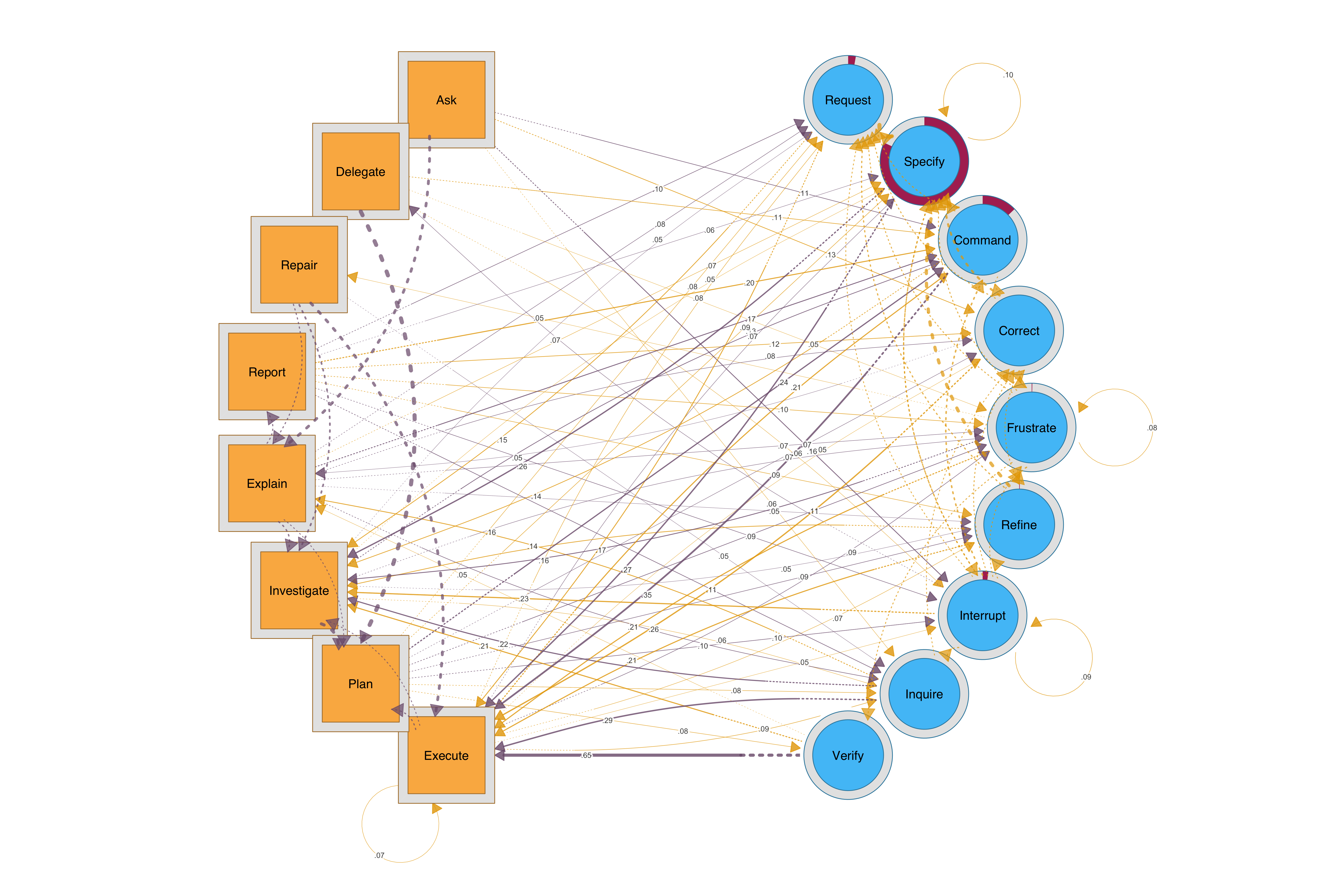
For a combined view, HTNA (Heterogenous Transition Network Analysis may offer a better view of how both sides interact). AI nodes are sequares and mine are circles
cograph::splot().Here is my Codebook
Human — 15 fine codes
| Code | Description | Examples |
|---|---|---|
| Command | Direct action instruction | “commit this”, “push it” |
| Direct | Structured directive with plan | “Implement the following plan:” |
| Request | Asking for something new | “add legends”, “write a report” |
| Specification | Precise parameters | “port 8000”, “tolerance 1e-12” |
| Context | Pasting errors, logs | [stack trace], [error output] |
| Refinement | Iterative adjustment | “less”, “also add counts” |
| Correction | Fixing misunderstanding | “No I mean the full demo” |
| Reject | Refusing AI proposal | [escape from plan] |
| Verification | Checking output | “show me”, “open it” |
| Frustration | Dissatisfaction | “ugly and crowded”, “pathetic” |
| Arguing | Pushing back | “You only tried with 100?” |
| Ask | Posing a question | “Have we implemented graphicalvar?” |
| Thinking | Brainstorming | “what do you think?” |
| Interrupt | Escape key, redirect | [Ctrl+C] |
| Accept | Accepting proposal | “yes, do it” |
AI — 18 fine codes
| Code | Description |
|---|---|
| Execute | Writing code, running commands |
| Comply | Carrying out without elaboration |
| Retry | Re-attempting after failure |
| Investigate | Reading files, searching code |
| Diagnose | Analyzing errors, debugging |
| Delegate | Spawning sub-agents |
| Plan | Proposing strategies |
| Scaffold | Breaking into sub-steps |
| Suggest | Offering alternatives |
| Apologize | Acknowledging errors |
| Hedge | Expressing uncertainty |
| Warn | Flagging risks |
| Refuse | Declining a request |
| Escape | Safety refusal |
| Explain | Describing what was done |
| Report | Presenting results |
| Acknowledge | Confirming receipt |
| Ask | Requesting clarification |
Limitations and caveats
The data was collected by AI from scattered json files across several projects and it is likely that some projects were duplicated (backup copies), missed some and also may have missed the count in some ways. Some of the coding here was automatic labelling. For instance, tool call was all labeled execution, this may not be entirely accurate. I would also like to emphasize that this was mainly demonstrative rather than showing a rigorous piece of empirical work.
References
Saqr, M., López-Pernas, S., Helske, S., Murphy, K., Tikka, S., & Scrucca, L. (2025a). Sequence analysis in education: Principles, technique, and tutorial with R. In M. Saqr & S. López-Pernas (Eds.), Advanced methods in learning analytics (pp. 1–28). Springer.
Saqr, M., López-Pernas, S., Törmänen, T., Kaliisa, R., Misiejuk, K., & Tikka, S. (2025b). Transition Network Analysis: A novel framework for modeling, visualizing, and identifying the temporal patterns of learners and learning processes. Proceedings of the 15th International Learning Analytics and Knowledge Conference (LAK ‘25). https://doi.org/10.48550/arXiv.2411.15486
Tikka, S., López-Pernas, S., & Saqr, M. (2025). tna: An R package for Transition Network Analysis. Applied Psychological Measurement. https://doi.org/10.1177/01466216251348840
Saqr, M. (2025). cograph: Complex Network Analysis and Visualization. R package. https://cran.r-project.org/package=cograph